
I have finally released Kaval.AI, the open-source Python library for building agentic workflows, chatbots and tools that I have been using for my own projects this year. I am pretty proud of how it turned out, so this first post is a brief tour of what it is, why it exists and what I consider its most important part.
Why another agent library?
I started working on the library at the beginning of this year, while building a chatbot for a client. I had just come back from a long vacation and had decided to move my attention from data engineering back to natural language processing, which is where I started my career.
There were already plenty of frameworks to choose from. The one I liked most was Atomic Agents. I also tried n8n, liked Microsoft's Semantic Kernel quite a bit and read through Google's GenAI SDK. All of them took care of the basic client wiring and came with a long list of features. None of them quite fit the way I prefer to work, though.
I am a pretty traditional developer in the sense that I want my code to be elegant, testable and observable, and I felt none of them ticked all three boxes. Doing simple things should be simple, and when doing something unusual, the framework should not get in the way too much. On top of that, at the beginning of 2026 the agent library landscape was still the Wild West: nobody really knew what they were doing and everybody was experimenting with new ideas, myself included.
So I wrote one that fits my coding style. Kaval.AI is opinionated. A lot of agent frameworks optimise for a spectacular first demo. Kaval.AI optimises for the months after that, when the thing has to be tested, deployed, debugged and maintained.
Writing a library from scratch also teaches you a thing or two about agent loops, tool calling and the complexity of orchestrating workflows around what are largely black boxes. That alone was worth it.
What Kaval.AI does
- Typed end to end. Inputs, outputs and tool calls are Pydantic models, so a workflow has a contract you can test against and the model's output is validated before your code sees it.
- Any model, one interface. OpenAI, Google, Anthropic, Ollama and in-browser WebLLM behind a single client. Switching providers is a string change.
- Workflows as graphs. Conditional routing, parallel fan-out, agents and tool calls, declared in Python or in YAML.
- Retrieval built in. RAG over SQLite or PostgreSQL/pgvector with local or hosted embeddings, without a separate vector service.
- Tools your way. Plain Python functions, REST endpoints and MCP servers.
- Streaming from a single model call up to a whole workflow.
- Full observability. Every session, run, node and model call is recorded and browsable in a backoffice UI.
To give you a taste, this is what a model call with a typed response looks like.
You name the model as provider/model and make_client does the rest:
from pydantic import BaseModel

from kavalai import make_client


class City(BaseModel):
    name: str
    country: str
    fun_fact: str


client = make_client("openai/gpt-5.6-luna")
city = await client.prompt("Describe Tallinn.", response_model=City)
print(city)
name='Tallinn' country='Estonia'
fun_fact='Tallinn’s remarkably well-preserved medieval Old Town is a UNESCO
          World Heritage Site, and the city is widely regarded as one of the
          world’s most digitally advanced capitals.'
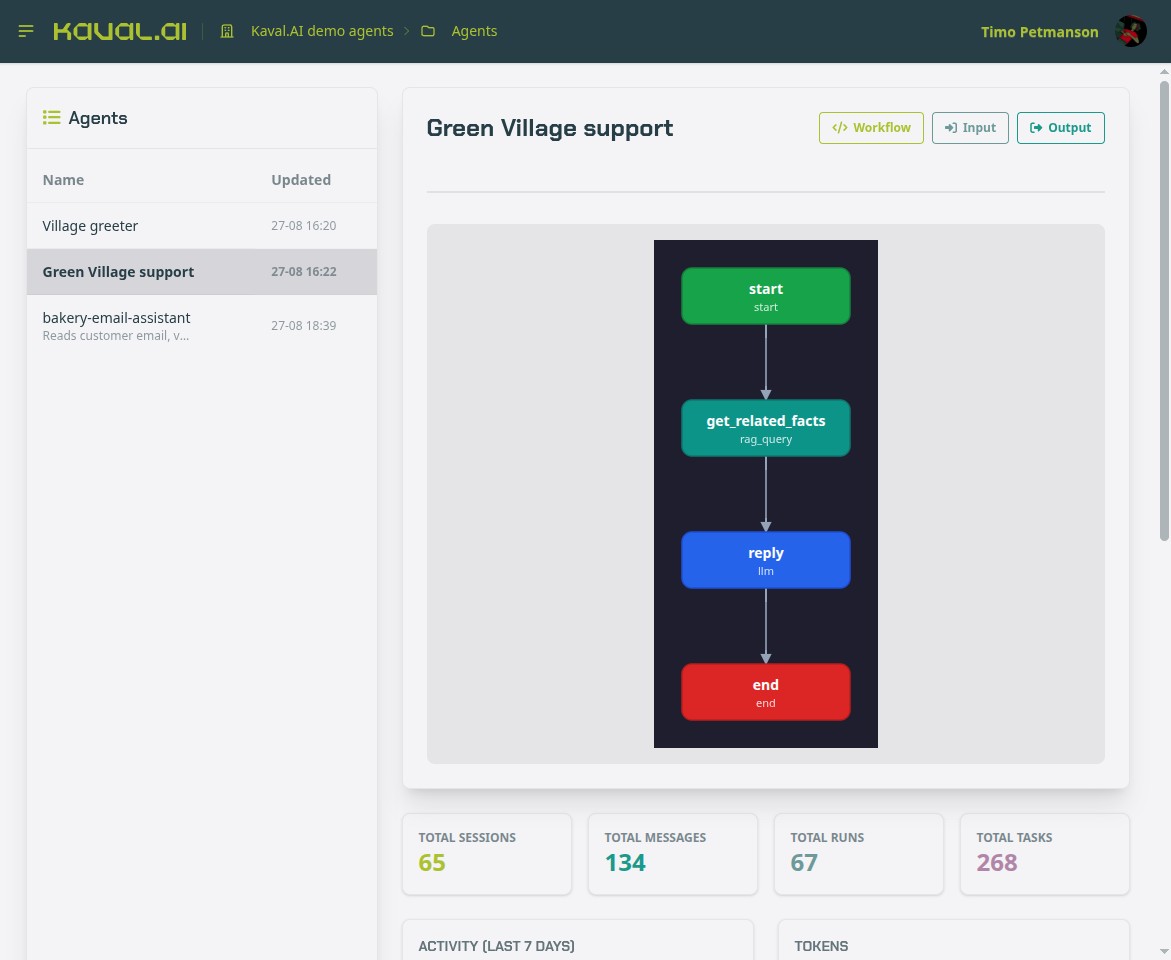
The same idea scales up. A workflow is a graph of nodes, each node reads typed data from the run context and writes typed data back, and the graph itself is something you can draw, which the backoffice does for you.
The documentation has tutorials for each of these, and the README walks through model calls, agents with tools, RAG and a complete workflow in a few screens.
Testing, debugging and evaluation
The clients and users are happy when the LLM-s and agents perform the way they were programmed. However, sometimes this is not the case. Maybe your website chatbot annoys 10% of the users, who will never return. These are the cases that can easily slip out of attention if your AI agent does not have proper logging and evaluation testing in place.
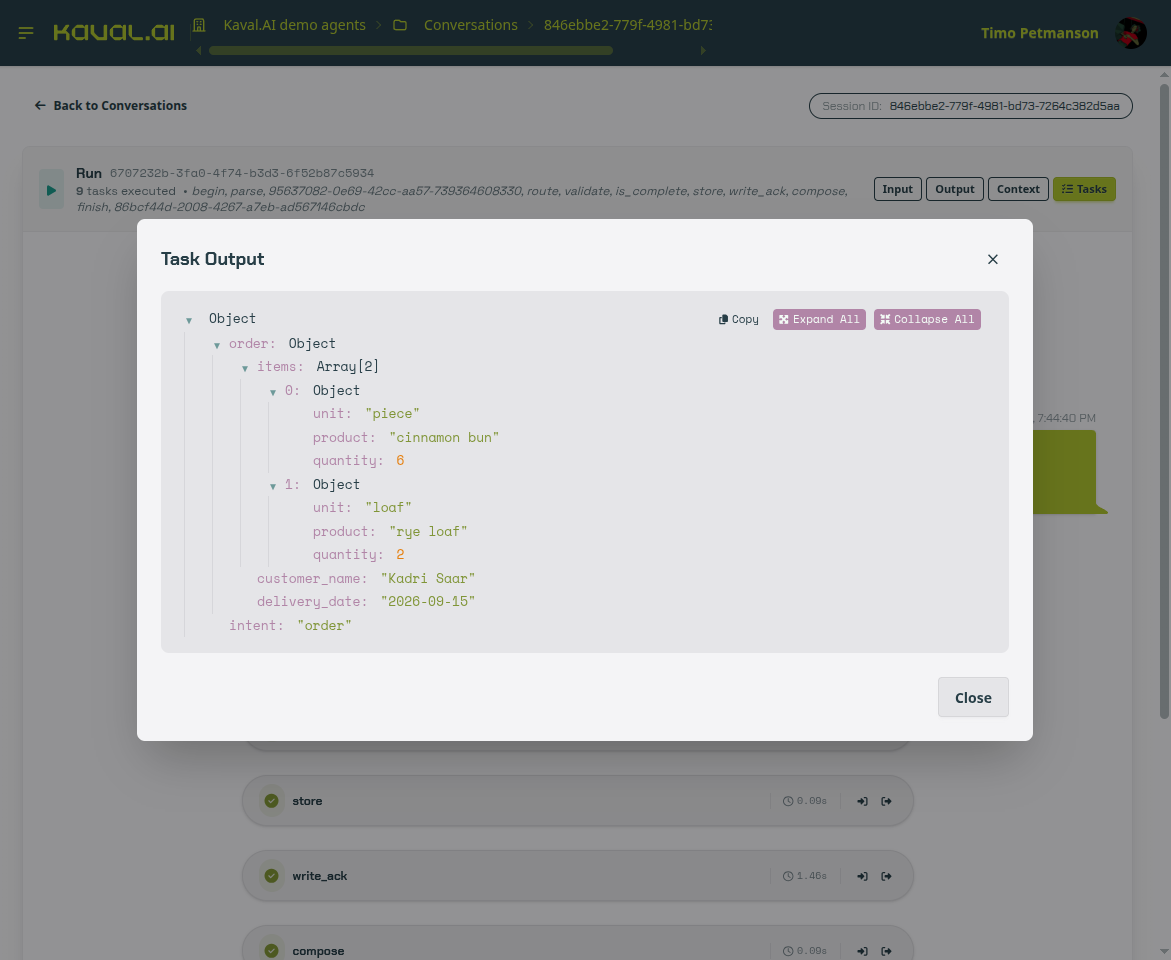
Every run in Kaval.AI can be recorded. Every node visit writes one task row with its input, output, timing and position in the graph, so ordering by sequence reconstructs the exact path a run took.
So if 10% of our users are not happy with the results, we can detect it by analyzing the chat logs. This helps to figure out what went wrong and how we can improve our chatbot.
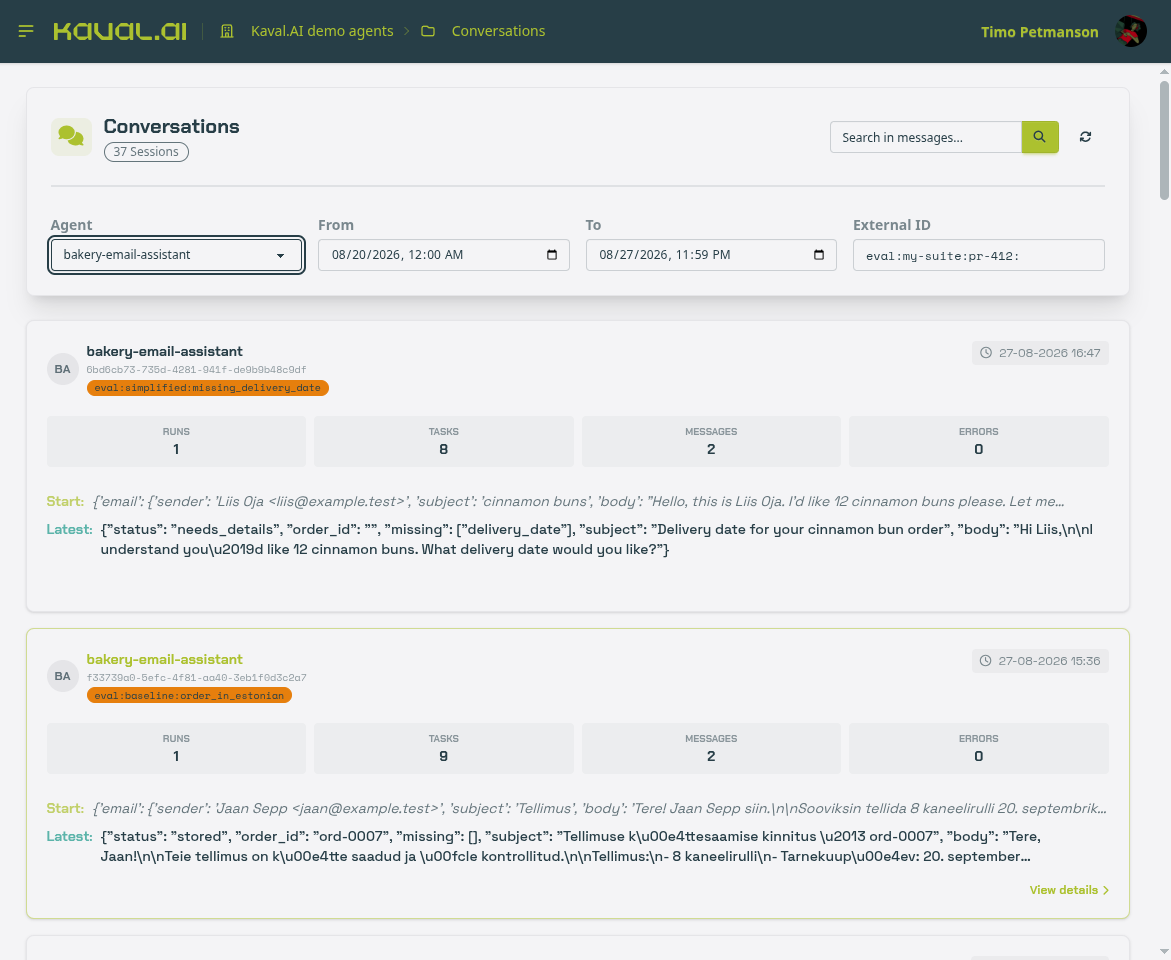
The backoffice UI is where all of this becomes browsable. Conversations lead to runs, runs lead to tasks, and each task opens into its structured input and output.
Evaluation testing
Finding and fixing a bad conversation is the easy part. Keeping it fixed is the hard part. Every prompt edit, every model upgrade and every new document in the retrieval index changes how the agent behaves, and unlike a regression in ordinary code, a regression in an agent does not fail the build or throw an exception. The bot simply starts giving worse answers again, and nobody notices until the users do. You cannot tell by reading the code, because the code did not change. So you need a repeatable way to check the behaviour before every deploy, the same way you would run a test suite.
This is what the kavalai.eval
package is for. A test case is a message to send and what the reply should
contain, and a suite is a list of such cases run against a live agent server.
Simple cases are checked literally. Some correct answers cannot be written down
in advance, so those cases hand the reply to a judge model with plain-language
criteria instead.
The important part is where the cases come from and where the failures go, and
that is why evaluation and observability are two halves of the same thing in
Kaval.AI. The cases come from the recordings: the sessions that went wrong in
the backoffice already have the exact input that triggered the problem, so once
the fix is in, that input becomes a test case. The failures go back to the
recordings: every case runs in a fresh session tagged with the suite name and
is recorded exactly like production traffic, which is what the eval: labels
in the conversations screenshot above are. When a case fails, you open that
session in the same task debugger and see which node produced the wrong value.
So the loop is: spot the problem in the logs, fix it, add the conversation as a case, run the suite before every deploy, and follow any failure straight back into the logs. In my opinion this loop, more than any single feature, is what separates an agent that can be maintained from one that only ever worked in the demo.
A word of caution that I also put in the docs: a suite can quietly become the specification, and an agent that passes every written case is not the same as an agent that handles real users. The suite is a safety net, not a substitute for reading the conversations.
Who is behind Kaval.AI

I am Timo Petmanson and I am the founder of OÜ Kaval AI. I studied computer science at the University of Tartu, was a junior researcher working with Estonian e-health data and was a major contributor to the Estonian natural language processing toolkit (ESTNLTK).
Later I worked as a data scientist at Funderbeam in Tallinn, spent almost three years as a software engineer at Google in Zürich, and after returning to Estonia worked as a senior data engineer at Veriff. In 2026 I started Kaval AI OÜ to build AI workflows, chatbots and tools for companies.
Outside of work I make music. I have released three solo albums of electronic music, play keyboards, guitar and, as of a few years ago, the trumpet, and I am a member of two bands: the compost-rock collective Mandarones and the psychedelic blues-rock band Kaibald, whose debut album we recorded this February. I also composed the soundtrack for the computer game Artist Life Simulator. When I am not in front of a screen or an instrument, I am probably hiking. You can find the music side of me at petmanson.com.