
Your chatbot already knows how to behave before you write a word: it answers from your website's pages, speaks for your business, keeps answers short and links to the page an answer comes from. Instructions are what you add on top: who your customers are, what matters most, how to sound and where to send people. This walkthrough shows where to write them, what works and what does not.
Note: Instructions and greetings can be changed on the Starter, Business and Scale plans. On the Free plan the chatbot runs with the default behaviour described below. See Plans and billing.
What the chatbot does by default
Every Kaval.AI chatbot follows the same built-in rules, and your instructions cannot switch them off:
- It answers only about your website. Questions about your products, services, prices, opening hours, policies and contact details are in scope. Homework, code, general knowledge, jokes and role play are not: it says in one sentence that it can only help with what you offer, and suggests something it can help with.
- It answers from your pages, not from its own knowledge. For each question it looks up the passages of your website that match best. When nothing matches, it says so ("we don't have that on our site") and points to a page or a way to reach you instead of guessing.
- It speaks as your business. It says "we offer" and "our prices", never "the website says".
- It links only to addresses it found on your pages. It never makes up a link.
- It keeps answers short: about two sentences, a little longer for a recommendation or a comparison, with up to three suggested follow-up questions under each answer.
- It answers in the visitor's language, even when your website is in another one.
- It knows the page the visitor is reading, so "how much is this?" on a product page is answered about that product.
- Visitors cannot talk it out of these rules, whatever they claim to be.
Because of these rules most chatbots give good answers with no instructions at all. Write instructions when you want to change the emphasis, not to teach the chatbot facts.
Write your instructions step by step
- Open Chatbots in the console and click the chatbot you want to change.
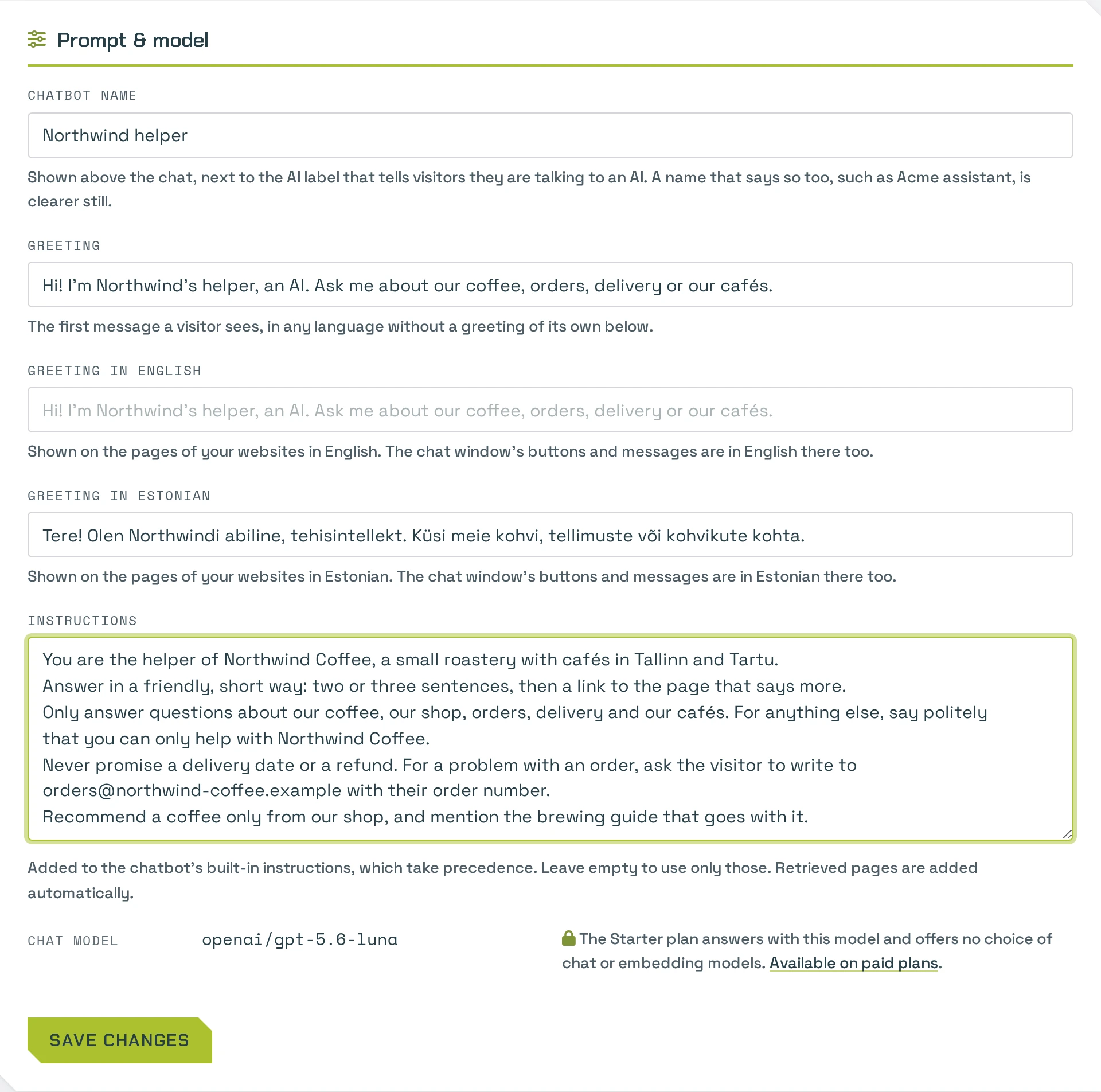
- Click Prompt & model. The page holds the chatbot's name, its greetings and the Instructions box.
- Write your instructions in the box, in plain language. The sections below have ideas and examples.
- Click Save changes. The change is live on your website at once.
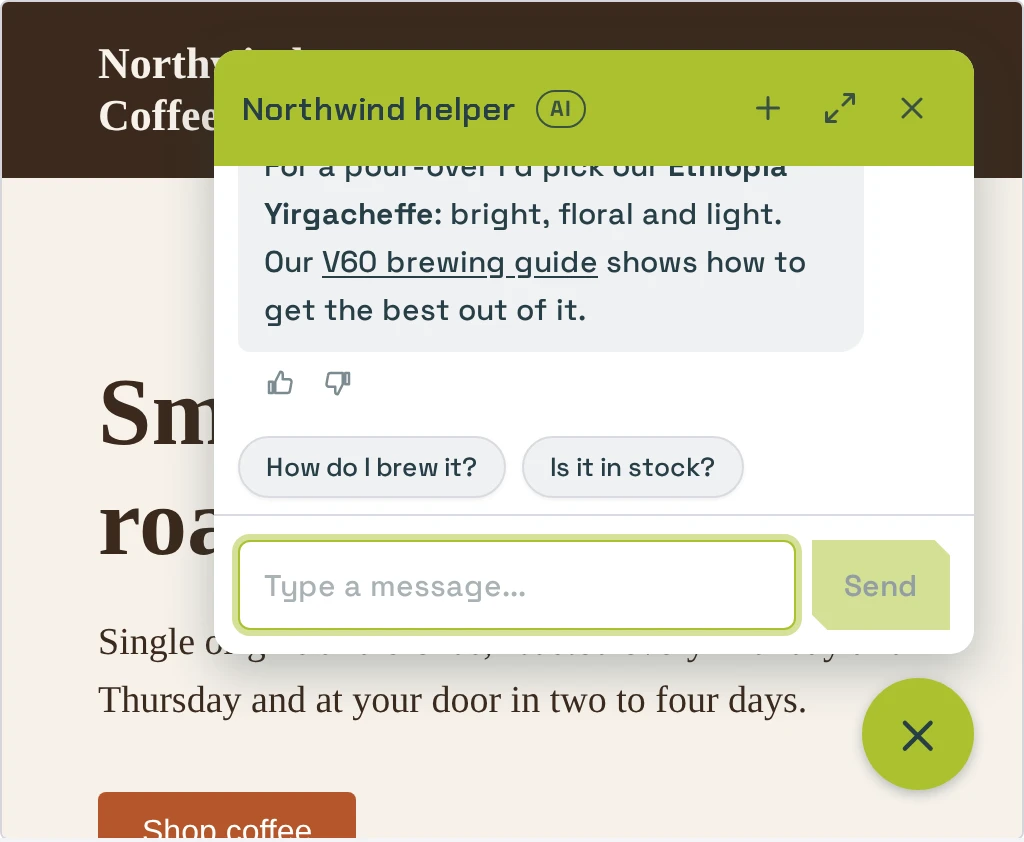
- Open Appearance & test and ask the preview the questions your visitors ask. Try the awkward ones too: a question your pages do not answer, a complaint, a question in another language.
- After a few days, read what real visitors asked on the Conversations page and adjust. See Analytics.
What good instructions contain
Short, concrete instructions work best. Five kinds of sentences do most of the work.
Who you are and who your visitors are. One or two sentences give the chatbot the context your pages leave out.
We are a family-run coffee roastery in Tallinn. Most visitors are home brewers
buying beans online, and some are cafés looking for a wholesale supplier.
What matters most. Tell it what to recommend when a visitor is undecided, and what to bring up first.
When someone does not know which beans to choose, recommend the House Blend
first: it suits espresso and filter alike. Mention free delivery over 40 euros
when a visitor asks about shipping.
Tone. Name the tone you want and, if it matters, how to address people.
Be warm and relaxed, like a barista talking to a regular. Use "you", avoid
jargon, and never use exclamation marks.
Where to send people. Say which page or channel a visitor should end up on for each kind of request. Name the page as it is called on your website: the chatbot links only to addresses it finds on your pages, so the page must exist and be crawled.
For wholesale enquiries, send people to our Wholesale page. For problems with an
order, ask for the order number and point them to the Contact page.
What to avoid. Name the topics you do not want the chatbot to handle, and what to do instead.
Do not give medical advice about caffeine. Do not promise delivery dates; say
that the dispatch time is on the Delivery page.
Examples you can adapt
A shop
We sell handmade leather bags and wallets, made to order in our Tartu workshop.
Visitors are usually buying a gift. Ask who the gift is for when that helps you
recommend something, then suggest two products with their prices. Mention that
engraving is free. Orders take two weeks to make; never promise a faster date.
Friendly and brief.
A service business
We are an accounting firm for small companies and sole traders in Estonia.
Answer questions about our services and prices. Do not give tax or legal advice
about a visitor's own situation: explain what we can do for them and send them
to the Book a call page. Formal but plain language, no jargon.
A software product
Our product is time-tracking software for construction teams. Visitors are site
managers and company owners. When someone asks whether it fits their team,
ask how many people they have, then point them to the matching plan on the
Pricing page. For technical problems send them to the Support page; do not try
to troubleshoot.
Fix common problems
| What you see | What to do |
|---|---|
| The chatbot says it does not know something that is on your website. | The page may not be in the index yet, or the passage may not match the question's words. Check with Similarity search. Instructions will not help here. |
| It answers correctly but recommends the wrong thing first. | Say what to recommend and to whom: "For beginners, recommend …". |
| It sounds too pushy, or not helpful enough. | Describe the tone in one sentence and give one example phrase. |
| It does not send visitors where you want them. | Name the page as it is titled on your website, and check that the page is crawled. |
| It answers in the wrong language. | It answers in the language the visitor writes in. For a one-word message it uses the language of the page the visitor is on; check your website's default language on its page in the console. |
| It refuses a question you want it to answer. | The question may look off-topic. Say in your instructions that this topic is part of your business, and make sure a page covers it. |
| Answers are too short. | Answers are short by design, so they fit the chat window. Ask it to end with a link to the page that has the details. |
Tips
- Put facts on your website, not in the instructions. Prices, hours and policies belong on your pages, where visitors and the chatbot both see them and where they stay up to date.
- Change one thing at a time, then test it in the preview, so you know what made the difference.
- Keep it short. A few clear paragraphs work better than a long list of rules that contradict each other.
- Use the greeting to set expectations. "Hi! Ask me about our beans, brewing or delivery." tells visitors what to ask. The greeting is on the same Settings page; see Customization.